Questwright – MZ Questline Forge (10 RPG quests built per minute)
$3.99
Questwright is a visual questline authoring tool for RPG Maker MZ. You design a questline by clicking — pick a template, write the objective, name the NPC, set the rewards — and it hands you a single data file. Its companion plugin reads that file, so a whole game's worth of quests drops in with…
Questwright is a visual questline authoring tool for RPG Maker MZ. You design a questline by clicking — pick a template, write the objective, name the NPC, set the rewards — and it hands you a single data file. Its companion plugin reads that file, so a whole game’s worth of quests drops in with one paste and one plugin command per NPC. No switch bookkeeping. No variable spreadsheets.
Quest templates included:
Talk — a conversation advances the quest.
Investigate — examine an object or place.
Fetch — collect N of an item; it’s removed on turn-in.
Deliver — carry an item from A to B.
Hunt — defeat N enemies; kills are counted automatically (no troop edits).
Choice — fork the story into 2–3 outcomes, each with its own rewards.
—————————————————————————————
Steps To Utilize Questwright:
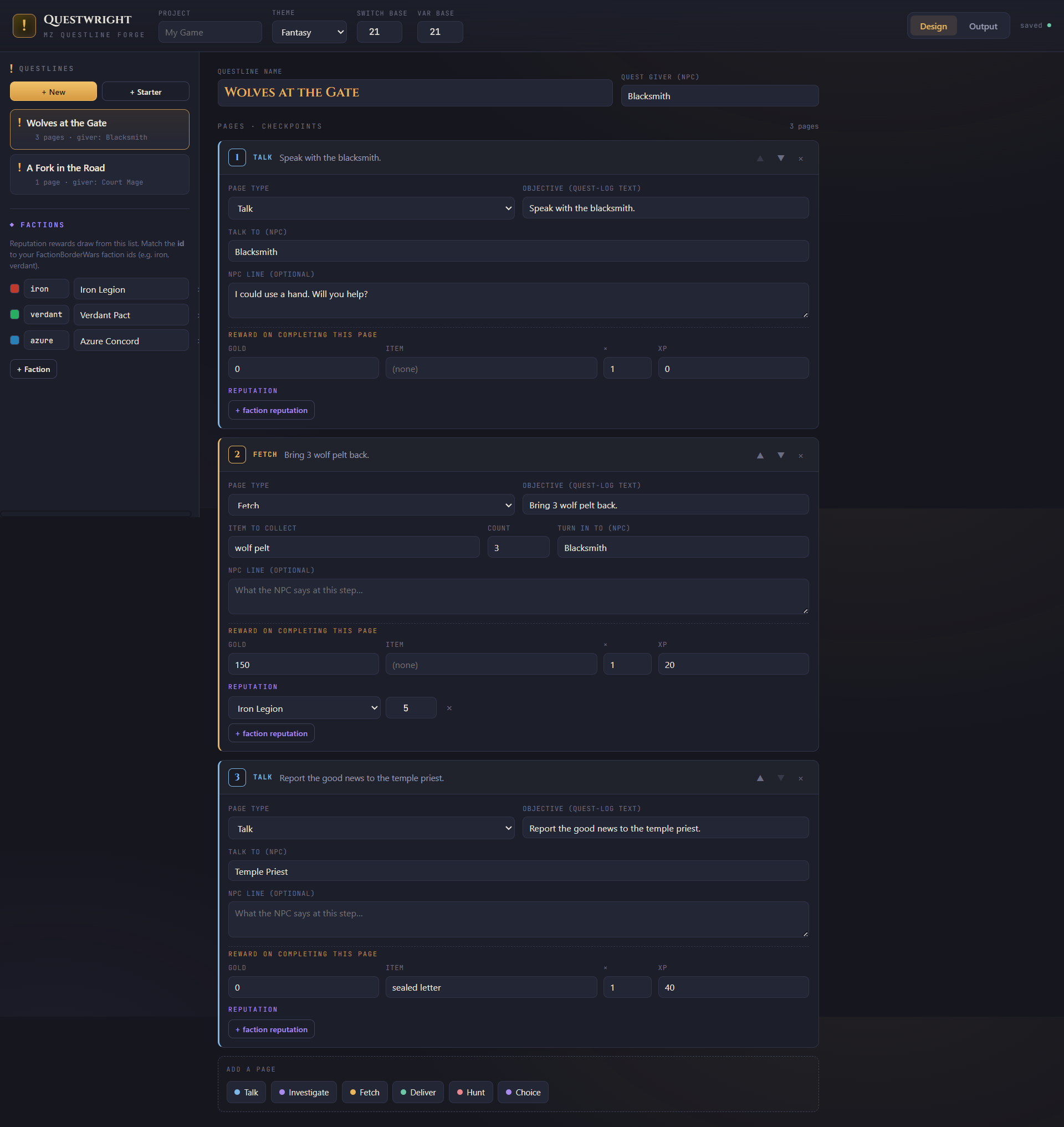
- Author a questline in QuestwrightOpen questwright.html. Type a project name, then check the Factions panel in the left rail (factions utilize the Warfare Bundle, not needed to utilize this plugin) — its ids must match your FactionBorderWars faction ids (iron, verdant, azure by default). Click “+ Starter” for a ready-made 3-page questline, or “+ New” and build your own. On the questline header set the giver NPC. For each page, choose the type (Talk, Fetch, Hunt, Deliver, Investigate, Choice), write the objective, name the NPC it happens on, and set rewards — including reputation by picking a faction and a signed amount.
- Match item and enemy names to your DatabaseThe plugin resolves reward items, Fetch items, and Hunt enemies by name, so those must exist in Tools → Database. If a Fetch page asks for “healing herb,” add a matching item under Database → Items; if a Hunt targets “dire wolf,” the name must match one under Database → Enemies. Capitalization doesn’t matter, but spelling and spacing do. This is the single most common reason a reward or objective silently does nothing.
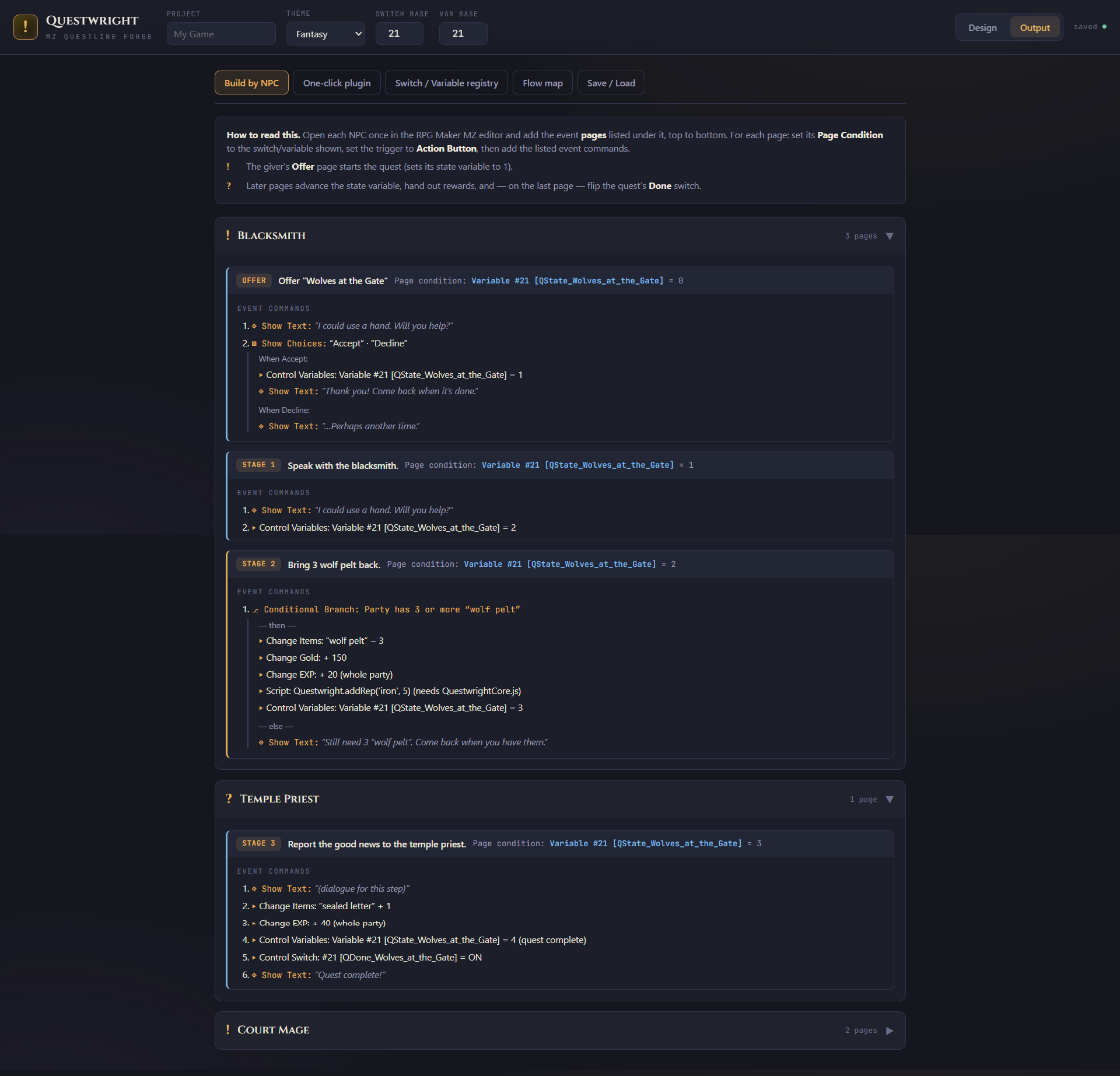
- Export the quest dataSwitch to Output (top-right toggle) and open the One-click plugin tab. Click “Copy quest data” (or “Download quests.json”) — that one blob contains every questline plus your faction list. The same tab lists each NPC tag you’ll need next, so leave it open for reference.
- Paste it into the pluginIn RPG Maker, open Tools → Plugin Manager and double-click QuestwrightCore. Click the Quest Data field, paste the JSON, and press OK. If you want reputation to affect the war, set “Mirror Reputation Into War” to ON here — and keep FactionBorderWars listed above QuestwrightCore in the plugin list. Save the project.
- Put one command on each NPCFor every NPC tag the tool listed, place an event on your map (right-click → New Event) where that character stands and set its Trigger to Action Button. Add a single command: Plugin Command → QuestwrightCore → Interact, and type the NPC tag exactly as it appears in the tool. Give the event a character graphic so the player can see them. That one command is the entire hookup — it offers, advances, and completes whatever quest business belongs to that NPC.
- Add a quest log (optional)For an in-game journal, add a menu option or a simple event — a signpost works — with Plugin Command → QuestwrightCore → Open Quest Log. It shows active quests with their current objective and lists completed ones.
- Playtest the chainStart a new game and talk to the giver. You’ll get an Accept / Decline choice; accepting begins the quest and sets it to stage 1. Follow the pages, fetch or defeat as required, and turn in — watch gold, items, and the reputation line appear as each page completes. If an NPC does nothing, its tag doesn’t match what you typed in the tool; fix the spelling. Keep the tool’s Flow map open as your map of the intended path.
FAQs
Do I need to know JavaScript? No. You build quests by clicking in the tool, paste one blob into the plugin, and drop one command on each NPC. No coding required.
Does it work without the plugin? Yes. The tool can print an exact “Build by NPC” event recipe (page conditions, triggers, and commands) for pure-vanilla eventing. The plugin is what makes import one-paste, and it’s what powers the quest log and reputation.
Does it require Faction Border Wars? No. Reputation is tracked on its own. Faction Border Wars is only needed if you want reputation to affect a live faction war, and it’s a separate plugin (not bundled here).
Will it mess with my existing switches and variables? Using the plugin, it uses none of yours — quest state lives in the save file. If you use the manual (no-plugin) recipe instead, it reserves IDs starting from a base number you choose, so nothing collides.
Can I edit quests after I’ve imported them? Yes. Edit in the tool, re-copy the Quest Data, and re-paste it into the plugin parameter. The JSON is the single source of truth.
Does it count kills for Hunt quests automatically? Yes, with the plugin — defeating an enemy whose Database name matches the target ticks the counter. No troop-page setup needed.
Does it work with RPG Maker MV? No. The plugin targets MZ specifically.
Where is my work saved? The tool autosaves in your browser and lets you export/import a JSON backup. In-game quest progress is saved inside each RPG Maker save file.
How many quests can it handle? It’s built for authoring hours of content — dozens of questlines with multiple branching stages each. Everything lives in one compact data file.
Can I use it in a commercial game? Yes. See the License section above.
Something isn’t triggering — what do I check first? Almost always a name mismatch: the NPC tag on the event must match the tool exactly, and reward/fetch items and hunt enemies must match your Database names (capitalization doesn’t matter, spelling and spacing do). The full Instructions file has a troubleshooting section.
Reviews
There are no reviews yet.