TEMPEST — Weather & Ambience Sound Generator
$3.99
TEMPEST is a weather & ambience sound forge. It builds atmospheric beds and impacts entirely from DSP — filtered noise, resonators and procedural rumble — so nothing is a recording and every render is unique. Pick a source, shape it with six sliders, and export a game-ready file: looping BGS…
TEMPEST is a weather & ambience sound forge. It builds atmospheric beds and impacts entirely from DSP — filtered noise, resonators and procedural rumble — so nothing is a recording and every render is unique. Pick a source, shape it with six sliders, and export a game-ready file: looping BGS ambience or a one-shot SE.
28 sources across six families:
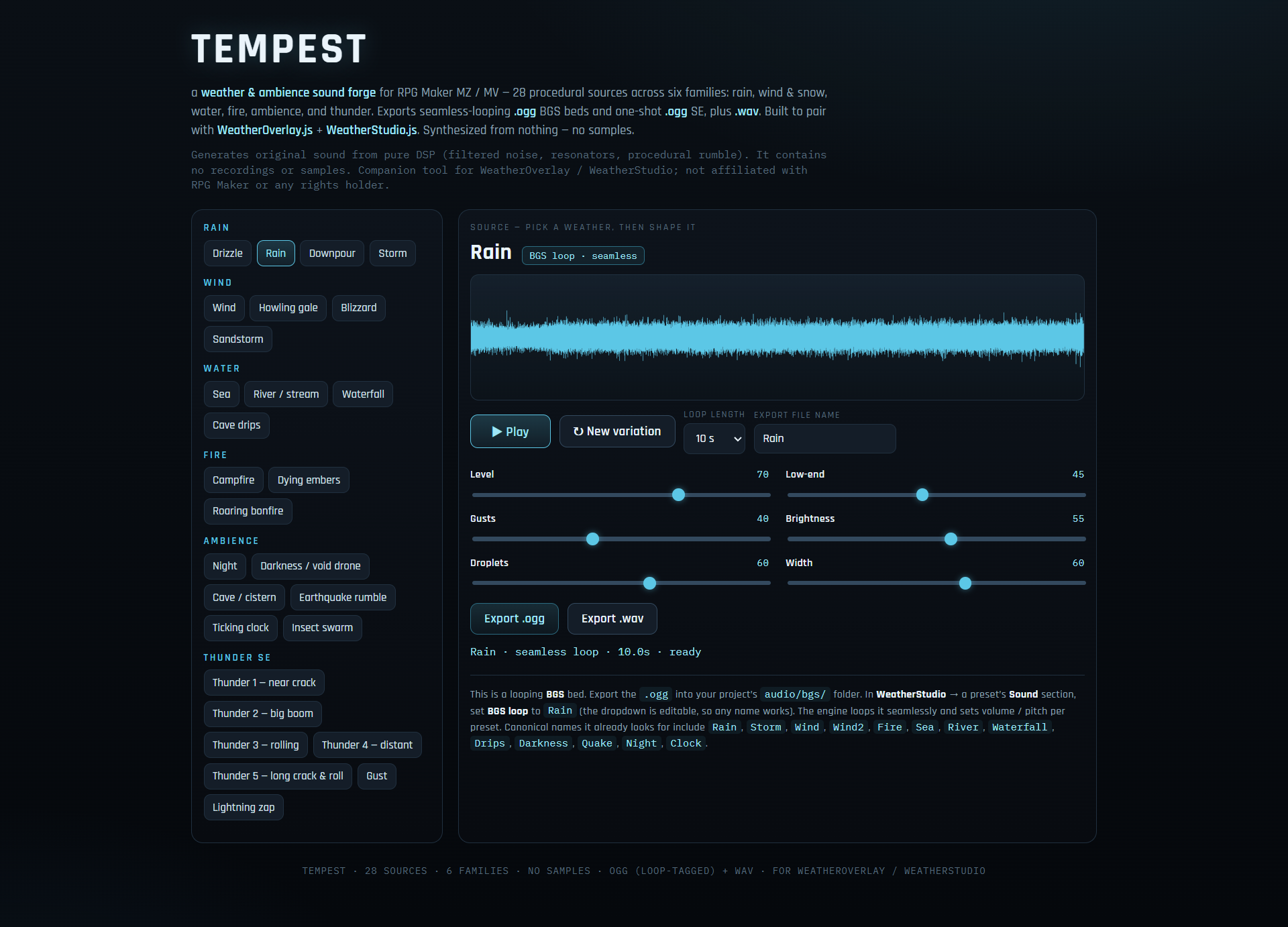
- Rain — Drizzle · Rain · Downpour · Storm (rain + wind + distant rumble)
- Wind & snow — Wind (breeze) · Howling gale · Blizzard · Sandstorm
- Water — Sea (rolling surf) · River · Waterfall · Cave drips
- Fire — Campfire · Dying embers · Roaring bonfire
- Ambience — Night (crickets) · Darkness / void drone · Cave · Earthquake rumble · Ticking clock · Insect swarm
- Thunder (SE) — Thunder 1–5 (near crack, big boom, rolling, distant, long crack-and-roll) · wind Gust · lightning Zap
Perfect for rainy towns, storms and boss build-ups, windswept fields and mountains, coastlines and caves, campfires and hearths, night scenes, dungeons, earthquakes and cutscene weather.
Designed to pair with region-based weather plugins. The source names line up with the presets in WeatherOverlay.js / WeatherStudio.js (Rain, Storm, Wind, Wind2, Fire, Sea, River, Waterfall, Drips, Darkness, Quake, Night, Clock, and Thunder1–Thunder5), so exports drop straight in. But they’re ordinary BGS/SE files — they work in any RPG Maker MZ/MV project on their own, and the OGG/WAV play in other engines too (Godot, Unity, GameMaker, Ren’Py…).
- Six sliders per family (e.g. Rain: Level · Low-end · Gusts · Brightness · Droplets · Width; Thunder: Level · Body · Rolls · Brightness · Tail · Width), a live waveform with playhead, a ↻ New variation reroll, and selectable loop length (6 / 10 / 16 / 24 s).
- Seamless loops. Bed exports are written with LOOPSTART / LOOPLENGTH tags and tail-matched, so BGS loops with no click or gap. Thunder exports as a clean one-shot (no loop tags).
- Export OGG and WAV. OGG for the game, WAV for a DAW.
- One self-contained HTML file. No install, no account, no plugins, no internet needed after download. Nothing is uploaded — it all runs in your browser.
- 100% synthesized. No samples, ever.
How to use it
- Download
weathersounds.html(or press ▶ to try it right here in your browser). - Open it in any modern browser — Chrome, Edge, or Firefox.
- Pick a source, shape it with the sliders, and hit ↻ for a fresh variation.
- Name the file (it defaults to a matching name) and Export .ogg (and/or .wav).
- Drop the file into your project:
- Looping beds →
audio/bgs/. In WeatherStudio → a preset’s Sound section, set BGS loop to the file name (the dropdown is editable, so any name works). WeatherOverlay loops it and sets volume/pitch per preset. - Thunder / gust / zap →
audio/se/. In WeatherStudio → a preset’s Lightning section, add the name to Thunder SE names. A random one fires on each strike. - No weather plugin? They’re still normal BGS/SE — pick them from any event or the database.
- Looping beds →
License
The audio you export is 100% royalty-free and yours — use it in commercial and non-commercial games, videos, or streams, no attribution required (a credit is always appreciated). Please don’t resell or redistribute the generator tool itself.
Good to know
- Works offline and cross-platform (Windows / macOS / Linux — it’s just a web page).
- AI disclosure: the tool’s code and this page’s cover art were made with AI assistance. The audio is algorithmically synthesized — not AI-model-generated audio, and not sampled from any recording.
- Made by RPG_Maker_Plugins. Questions or requests? Leave a comment.


Reviews
There are no reviews yet.